Claim Artist Page Spotify: Step-by-Step Guide 2026
Learn how to Claim Artist Page Spotify step by step, with prerequisites, verification checks, common fixes, and how House of Lyrics claims compare.

Your first track has just appeared on Spotify, but the photo is wrong, the bio is empty, and another artist with a similar name is sitting one search result away. You can't pitch the next release, check who's listening, or fix the page fans land on. That's the frustrating moment most musicians realize they need to Claim Artist Page Spotify access, not just upload music and hope the profile sorts itself out.
The good news is that claiming is straightforward when you prepare properly. The trick is knowing who should submit, what evidence Spotify trusts, and what approval gives you. Get those pieces right and you'll avoid the stalled requests and wrong page headaches that catch so many teams.
Table of Contents
- Who Can Claim and What to Gather First
- How to Claim Your Artist Page on Spotify Step by Step
- What a Claim Proves and What It Does Not
- Claim Problems and How to Fix Them
- Compare Your Claims and Submit This Week
Who Can Claim and What to Gather First
Spotify builds artist profiles automatically when music arrives through a distributor or label. You can't create one by hand, so your job is to claim the page that already exists and prove you're the right person to control it.
That sounds simple, but teams stumble when everyone assumes someone else handled it. A manager submits one request, the label submits another, and the artist tries a third email address. I recommend choosing one authorized claimant before anyone clicks submit.
The Three Things to Gather
Before you start, pull together three items. You'll need the canonical Spotify artist URL or URI from your distributor, your official website or linked social accounts, and a record showing you control the catalog, such as a delivery confirmation.
If you release under a stage name, match that name on the distributor record exactly. A small difference in spelling, punctuation, or feature credits is a frequent reason artists claim the wrong profile, especially when another act shares a similar name.
Who Claims and What Each Claimant Needs
| Claimant | Who Usually Holds It | Evidence to Gather |
|---|---|---|
| Solo artist | Artist with a distributor account | Artist URL or URI from distributor; official website or social links |
| Band member | One designated representative for the band | Distributor delivery record; agreement on one claimant; official social links |
| Manager | Management team with written authorization | Signed authorization from the artist; distributor record; official social links |
| Label or rights holder | Label team with catalog control | Label delivery record; rights documentation; official website |
| Former member or estate | Estate representative or rights administrator | Confirm the approach with Spotify support before submitting; rights documentation |
For a former member or estate, there's no standard evidence list confirmed in the same way, so contact Spotify support before submitting any request. Guessing can create a pending claim that blocks the properly authorized person.
If you're still deciding where to build first, it helps to compare SoundCloud and Spotify for artists because the platforms reward different release habits and audience behavior. Newer artists can also use this preparation stage to check the basics in our guide on how to start a music career, particularly keeping names and artwork consistent everywhere.
Ready to proceed check: The profile page loads, the name and imagery match your releases, and you have a Spotify account you can sign in with.
Don't rush past that check. Five minutes comparing the URI, artwork, and track list now can save days of support messages later.
How to Claim Your Artist Page on Spotify Step by Step
You can complete the request today if your distributor has already delivered music and given you the artist link. Follow the steps in order and resist the urge to submit twice when the answer doesn't arrive instantly.
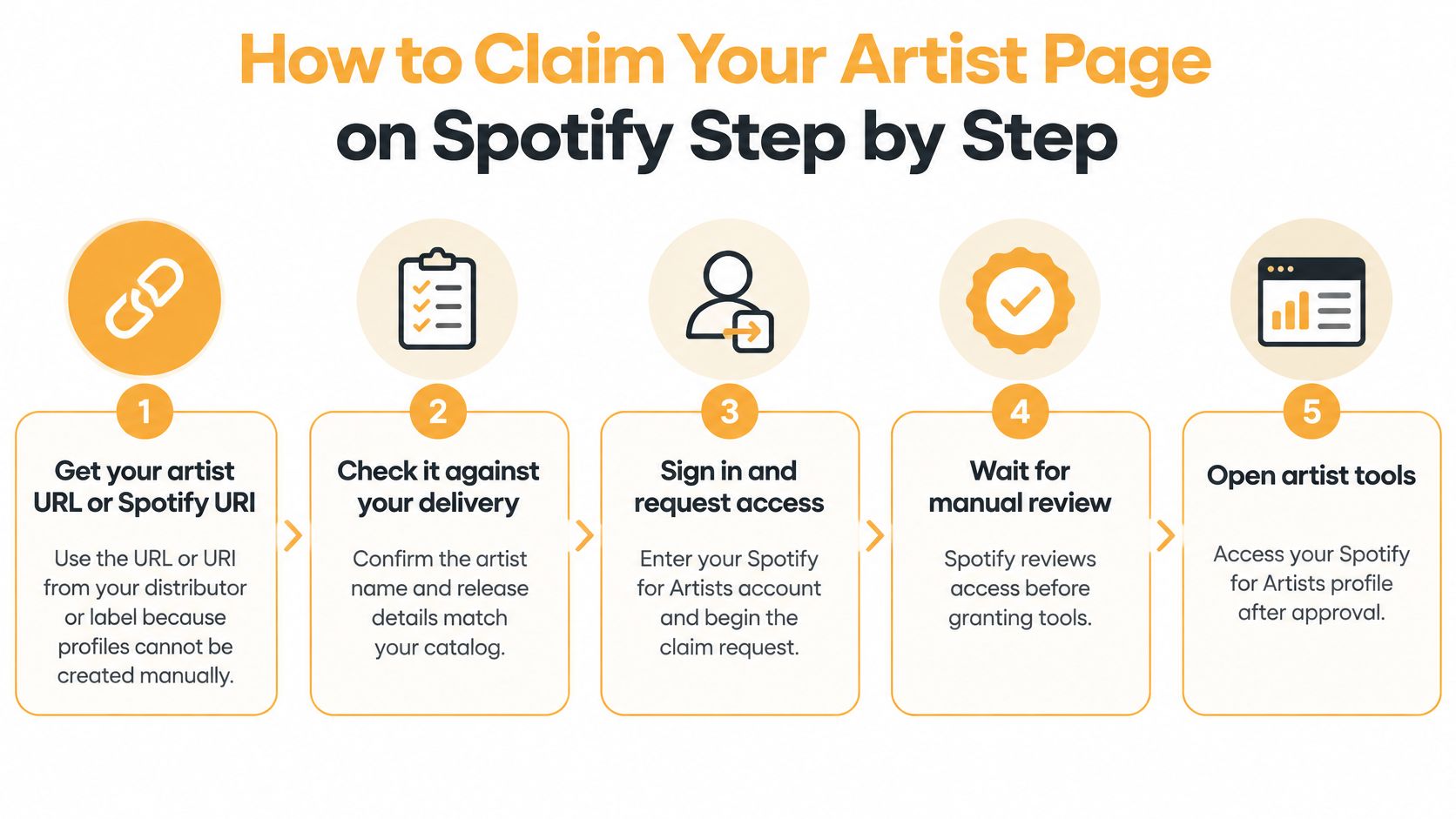
The Six Step Claim Process
- Get the artist URL or Spotify URI. Ask your distributor or label for the exact link connected to your delivery. The Spotify support guide on creating an artist profile confirms artist profiles are created automatically when music is delivered through a label or distributor and artists cannot create them manually.
- Check it against your delivery record. Match the artist name, releases, and catalog details before you claim. A wrong URI can create catalog mapping problems that you can't fix just by editing the profile.
- Open Spotify for Artists and sign in. Use the account that will manage the profile long term, not a temporary personal login you'll lose access to when a team member leaves.
- Find and select the correct profile. Paste the URL or URI rather than relying only on name search. Name collisions are common, and selecting the tidy looking page isn't proof it's yours.
- Submit one access request with official identity links. Add your website or social channels so Spotify can verify identity. Make sure the name, photo, and music links on those channels clearly match the artist page.
- Wait for manual review. Approval can take a few days, and only one access request may be active for an artist profile at a time. Don't send a second request while the first is pending because duplicate submissions can block the cleaner one.
Spotify recommends claiming before release when your distributor can provide the link, and advises allowing at least 7 days before release for profile preparation and editorial pitching. That buffer matters. It gives you time to upload images, write a bio, check credits, and prepare an unreleased track pitch without racing the release clock.
Submit once, with the strongest evidence you have, then leave the request alone while it's under review.
What to Do While You Wait
Use the waiting time productively. Prepare your avatar and header images, draft a concise bio, gather press photos, and list the official social links you'll add after approval. Plan announcement content too, and SleekPost's guide to Instagram scheduling is useful if you want release posts ready before access lands.
Keep your distributor and management records in one folder. If Spotify asks follow up questions, you won't waste time hunting through old emails for delivery confirmations or authorization letters. This is also a good moment to align the claim with your wider plan for how to release music, so the profile, artwork, and campaign dates all match.
Success is easy to recognize. Your artist profile appears in the Spotify for Artists dashboard, with profile tools, audience statistics, and promotional tools ready to use. You can then update imagery, manage your presence, review listener data, and prepare future releases from one place.
Don't treat approval as the finish line. Check the public page on desktop and mobile, confirm every release sits under the right artist, and fix missing links immediately. Fans often discover you through a playlist or search result, and a complete page gives them a reason to follow rather than click away.
What a Claim Proves and What It Does Not
Spotify's former blue Verified Artist checkmark is transitioning to Registered Artist, which signals a profile is claimed and actively managed in Spotify for Artists. That wording change matters because it describes platform access more accurately.
The visual below separates those benefits from the limits, so you don't overstate what approval means to a label, collaborator, or sponsor.
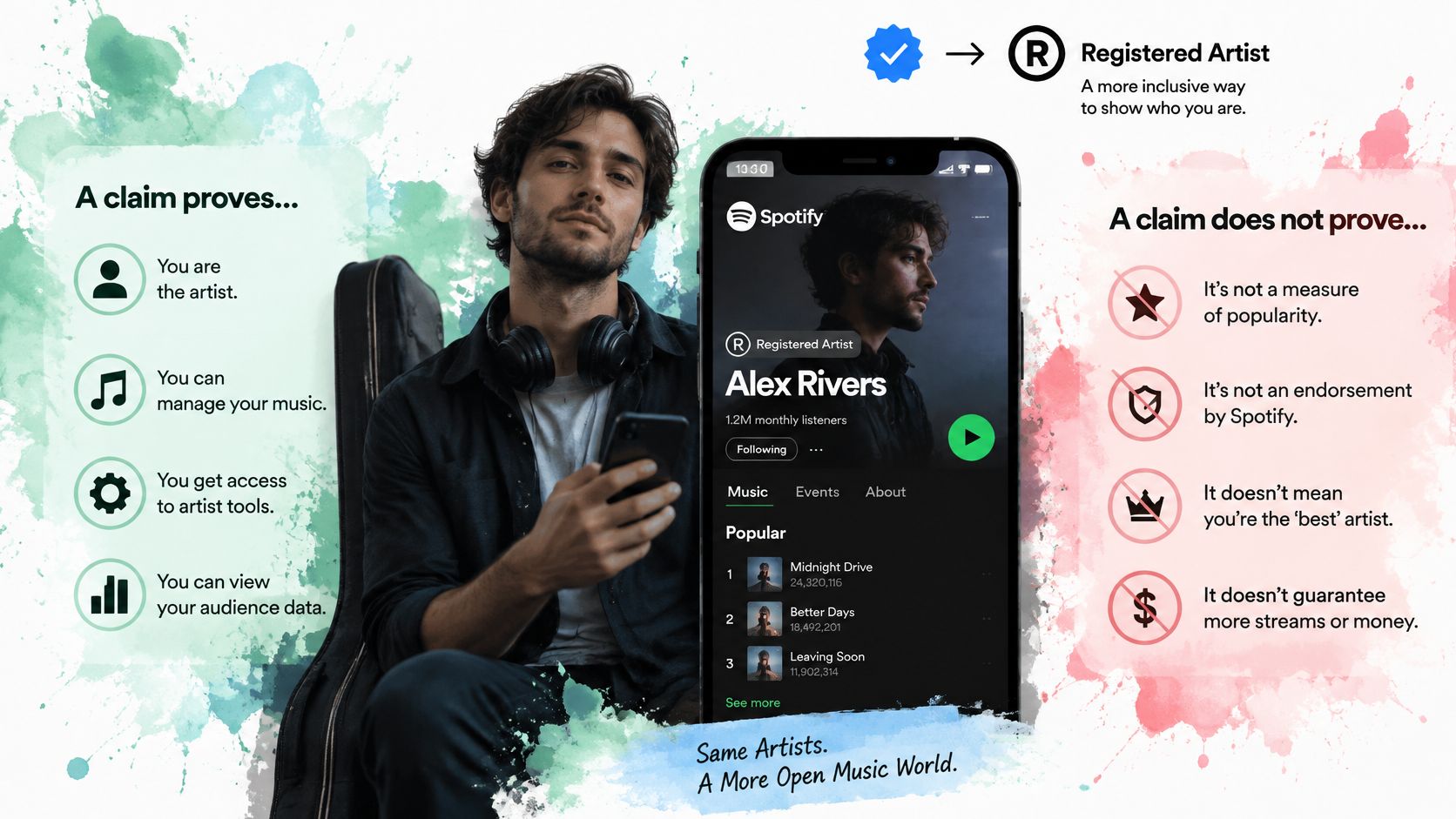
A claim gives you or your authorized team control over profile tools. It doesn't establish legal ownership of every recording, lyric, composition, or artist name trademark. Those rights still depend on contracts, registrations, splits, and chain of title documents, which is why teams dealing with shared catalogs should understand music rights management alongside platform access.
Three Outcomes People Confuse
Platform access means you can manage the Spotify for Artists profile. Identity verification is Spotify checking that the claimant connects credibly to the artist through official links and records. Verified by Spotify is a separate authenticity outcome with additional audience and presence signals.
The Spotify Verified by Spotify support page sets an eligibility benchmark of at least 10,000 monthly active listeners for three consecutive months and at least 1,000 followers for the badge. Spotify also considers evidence such as linked social accounts, concert dates, merchandise, policy compliance, and an authentic catalog.
Meeting those numbers doesn't guarantee immediate approval because reviews occur on a rolling basis. Spotify also doesn't publish a universal claim approval success rate, so treat any vendor promised percentage with caution unless they define the sample, market, timeframe, and denominator.
The short walkthrough below is a useful visual reminder of the access side before you think about badges.
Governance deserves the same attention as the badge. Before changing public metadata or lyrics, agree who is authorized, keep written approval, and preserve distributor records. A band breakup, management change, or label dispute becomes much harder when nobody documented who controlled the page.
A badge signals an actively managed account, not a full rights determination.
Claim Problems and How to Fix Them
The most common blocker isn't rejection. It's a pending request nobody in the team remembers submitting.
Only one access request can be active per profile. When an artist, manager, and label all try to help, their duplicate attempts can block progress until the pending review is resolved. Check status and ask the whole team before resubmitting.
Claim Symptoms Causes and Fixes
| Symptom | Likely Cause | Fix |
|---|---|---|
| Request has no reply for days | Manual review still in progress | Wait for review, then check status before doing anything else |
| Cannot submit a new request | A pending request already exists | Resolve or wait for the pending review instead of resubmitting |
| Wrong artist profile appears | Name collision or wrong URI | Verify the URI against the distributor delivery record before submitting |
| Request declined for identity | Missing or inconsistent official links | Add a live website or social links with matching name and imagery, then resubmit |
| Badge not showing despite strong listening | Rolling review, thin off-platform signals or incomplete profile | Complete bio, credits and linked accounts, then allow review time |
Thin evidence causes many avoidable declines. An empty bio, no linked social accounts, a private profile presented as official, or artwork that looks unrelated across channels gives a reviewer little to connect. Strengthen the public trail first, then submit a clean request.
Consistency is your best diagnostic tool. Compare these details side by side before you contact support:
- Artist name: It matches the distributor delivery exactly, including punctuation and stylization.
- Imagery: Your avatar, social photos, and release artwork look like the same act.
- Catalog: Every track on the page belongs to you and no release sits under a soundalike profile.
- Official links: Your website and social accounts are live, public, and point to the same music.
A wrong page claim is more serious than a typo in your bio. Profile editing often can't correct catalog mapping created by the wrong URI, so pause and verify the distributor record before submission. Precise metadata management prevents many of these problems because clean titles, credits, and identifiers travel with each release.
Timing also affects your fix. Waiting for manual review may take days, while correcting delivery metadata depends on your distributor and can take longer because the change has to move through their system. Don't promise a release date fix until you know which side owns the problem.
I would start with the cheapest checks first. Confirm no request is pending, verify the URI, make official links public, and align imagery. Escalate with records only after those basics are clean, because support can act faster when your evidence tells one consistent story.
Compare Your Claims and Submit This Week
Spotify controls your streaming profile and audience tools, but it doesn't give fans an artist approved home for lyrics, credits, and official video in the same way. Claiming both Spotify and House of Lyrics lets the catalog and the words behind it tell the same story.
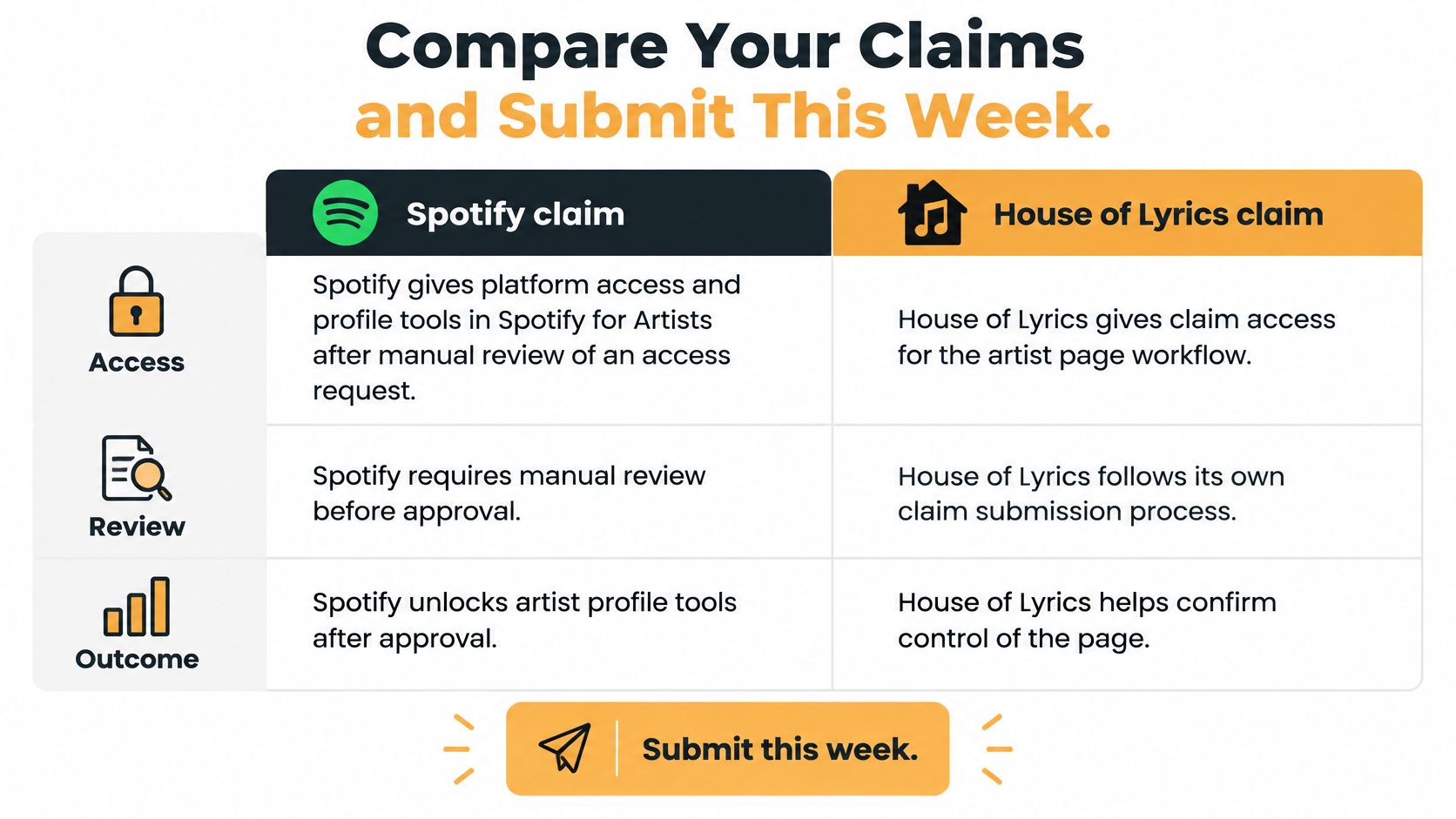
Spotify Claim Compared With House of Lyrics Claim
| Criterion | Spotify Artist Page | House of Lyrics Artist Page |
|---|---|---|
| Verification | Manual review of an access request with website or social links | One-time code placed in the X or SoundCloud bio |
| Cost | Free to claim | Free to claim the artist page |
| What you manage | Profile tools in Spotify for Artists | Albums, songs, official video embeds and your own lyrics |
| Review before publishing | Manual review of the access request, typically a few days | Editor review before lyrics and metadata go live |
| Page structure | One artist profile with releases | Separate artist, album and song pages |
On House of Lyrics, you register and verify ownership by placing a one-time code in your X or SoundCloud bio. Claiming is free and lets you manage lyrics, chords, embeds, and your public profile.
A claimed artist can manage albums, songs, and official video embeds, and publish their own lyrics with a full editor before anything goes live. Changes are reviewed before publication, which helps keep credits and lyric text accurate.
Page structure is the practical difference many artists miss. Artist, album, and song pages are separate on House of Lyrics, so each song you want to control needs its own claim. That separation is useful because a single needs its own lyrics, credits, and official video embed rather than being buried inside a general profile.
The Order I Recommend
Claim the Spotify profile first because it anchors your official catalog, release names, and artist identity. Then match names, song titles, album details, and credits on House of Lyrics. When a fan moves from streaming to reading the lyrics, they should see the same spelling and the same featured artists in both places.
Matching credits across sources builds trust with fans, journalists, playlist editors, and collaborators. Artist approved lyrics reduce misquotes, and placing the official video beside the lyrics gives listeners one reliable page to share. Those details also support your broader work on how to promote your music, because every campaign link leads to information you control.
Your Pre Submission Checklist
Run through this list before you submit anything this week:
- URI matches: The Spotify URI matches the distributor delivery record.
- Identity is consistent: Name and imagery align across official channels.
- Profile content is ready: Bio and credits are complete and accurate.
- Links are live: Website and social accounts are public and current.
- One claimant is chosen: The artist, band, manager, or label has agreed who submits.
- No request is pending: Nobody else has an active claim blocking the profile.
Submit the Spotify access request today. Then, if lyrics, credits, and videos matter to you, claim your House of Lyrics artist page with the bio code and work through priority songs.
Once approved, review the bio and credits before announcing the pages. Fix capitalization, featured artist names, album order, and broken links while the audience is still small. Accuracy at launch is much easier than correcting screenshots, reposts, and fan transcriptions after a song starts spreading.
Ready to pair your Spotify claim with pages you control for lyrics, credits, chords, and official videos? Claim your artist page for free at House of Lyrics, verify with the one-time bio code, and publish accurate, artist approved song pages your fans can trust.